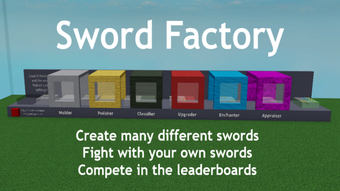

Sword Factory: Build Your Ultimate Blacksmith Empire
Overview
Sword Factory is a free tycoon game built for Roblox, offering players a unique blend of factory management and sword crafting. The game centers around building and upgrading a sword manufacturing operation, where players produce weapons of varying strength and rarity to sell for profit. As the factory grows, so does the player’s ability to create more powerful and valuable blades, unlocking new production stages and features. The core gameplay loop revolves around generating income through sales, reinvesting in machinery, and expanding the factory’s capabilities.
Designed for casual gamers and fans of business simulators, Sword Factory appeals to players who enjoy incremental progression, automation, and strategic upgrades. The game’s mechanics are rooted in simple yet engaging systems: crafting swords through a series of machines, leveling up components, and unlocking new areas as experience is earned. Real-world usage scenarios include short gaming sessions during breaks, long-term progression for dedicated players, and hands-on learning of basic resource management and automation concepts.
While the developer’s background is not publicly detailed, the game’s presence on Roblox suggests a focus on accessible, community-driven content. The game supports both Windows and Mac platforms, allowing broad access to players across different systems. Its free-to-play model removes entry barriers, making it ideal for newcomers to the tycoon genre.
Key Features & Capabilities
- Sword Crafting Pipeline – Players begin by spawning basic swords at the first machine, which then progress through a series of stations before reaching the selling point. Each stage contributes to the sword’s final properties, including strength, enchantments, and rarity.
- Machine Upgrades – Each production machine can be leveled up to improve weapon quality. Upgraded machines increase the value and power of swords, enabling higher profits and access to advanced crafting options.
- Factory Expansion – As players gain experience through crafting, selling, and combat, they unlock new factory areas such as the Ascender and the PvP lobby. These zones introduce new mechanics and opportunities for progression.
- Automated Production – Once the automatic spawner is unlocked, the factory continues operating without direct input. Machines build, upgrade, and sell swords independently, allowing players to multitask or step away from the screen.
- Rare Weapon Collection – Players can choose to save high-value swords in the bank station instead of selling them. These rare weapons can be used in PvP arenas to earn experience and test skills.
These features support a self-sustaining gameplay loop where success is measured by both financial growth and progression. The ability to balance income generation with strategic retention of rare items adds depth to the experience. Players can focus on passive income, active combat, or a mix of both, depending on their preferred playstyle.
User Interface, Workflow & Performance
The user interface in Sword Factory is designed for clarity and ease of navigation within the Roblox environment. Core functions such as machine management, sales tracking, and factory expansion are accessible through a streamlined layout. The workflow follows a logical sequence: create → upgrade → sell → reinvest, which supports intuitive progression without requiring extensive tutorials.
Navigation is consistent with Roblox’s standard interface, making it familiar to users already active on the platform. The game’s automation features reduce the need for constant attention, allowing players to engage with the game during downtime or in the background. Performance is expected to be stable on modern systems, though exact resource usage details were not specified. The developer did not provide additional system requirements, so performance may vary based on device capabilities.
Stability is likely maintained through Roblox’s optimized runtime environment. However, users should be aware that performance can be influenced by the platform’s overall load and background processes. CPU and RAM behavior were not disclosed, but typical Roblox applications are designed to operate efficiently within standard desktop limits.
Compatibility & System Requirements
Sword Factory is available on both Windows and Mac operating systems, ensuring accessibility for a wide range of users. The application has a file size of 250 MB, indicating a lightweight installation that does not require significant storage space. The software version is listed as 1.0, suggesting a stable initial release with a clear development path ahead.
Exact system requirements were not listed by the developer. Compatibility information is limited to the supported platforms. The developer did not specify minimum CPU, RAM, or graphics requirements. As such, users should rely on general system recommendations for running Roblox games, which typically require a modern processor, at least 4 GB of RAM, and a compatible graphics card.
Installation is straightforward and consistent with Roblox’s standard procedures. No additional software or drivers are required beyond the Roblox platform itself. Players can access the game directly through the Roblox client or web browser, depending on their preferred method of entry.
Pros and Cons
Pros
- Free to play with no hidden costs
- Simple, intuitive interface with clear progression
- Automation allows for passive income generation
- Engaging blend of crafting, upgrading, and strategy
- Supports both Windows and Mac platforms
Cons
- No detailed system requirements provided
- Performance data not disclosed by developer
- Progression tied to Roblox platform, limiting standalone use
- Limited customization options for factory layout
- Dependent on internet connection for gameplay
FAQ Section
Is Sword Factory available for Windows and Mac?
Yes, Sword Factory is compatible with both Windows and Mac operating systems, allowing players on different platforms to participate in the game.
Is the game free to download and play?
Yes, Sword Factory is completely free to download and play. There are no upfront costs or in-game purchases required to access the core gameplay.
Do I need an internet connection to play?
Yes, since Sword Factory is a Roblox-based game, a stable internet connection is required to access and play the game.
Can I play the game offline?
No, the game cannot be played offline. It relies on the Roblox platform’s online infrastructure for all gameplay functions.
What kind of updates can I expect?
As a Roblox game, Sword Factory may receive updates through the platform’s content delivery system. The frequency and nature of updates depend on the developer’s roadmap, which is not publicly detailed.
Final Thoughts
Sword Factory delivers a satisfying and accessible tycoon experience that blends factory management with sword crafting in a fun, low-pressure format. Its free-to-play model, combined with automation and incremental progression, makes it ideal for casual gamers and fans of business simulators. The game’s structure encourages long-term engagement through a mix of passive income and active strategy, with opportunities to unlock new areas and collect rare weapons.
While the lack of detailed system specifications and performance data limits in-depth technical evaluation, the game functions well within the Roblox ecosystem. The user interface is intuitive, the workflow is logical, and the core mechanics are engaging. For players seeking a light-hearted, creative simulation with a medieval twist, Sword Factory stands out as a solid choice.
Download Sword Factory now and begin forging your legacy as a master blacksmith.







